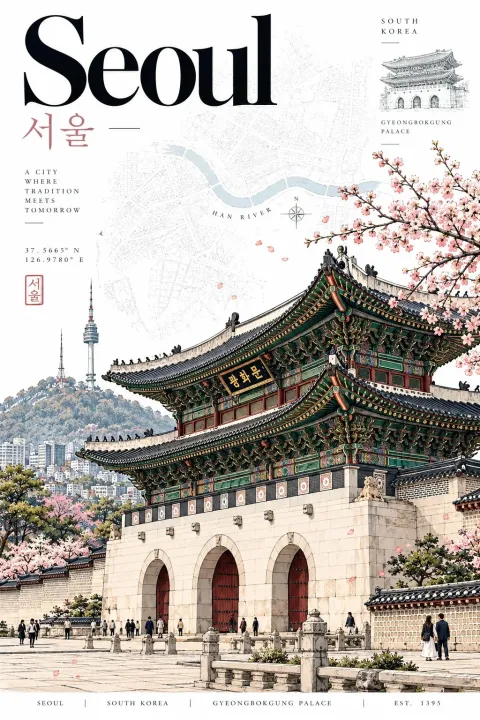
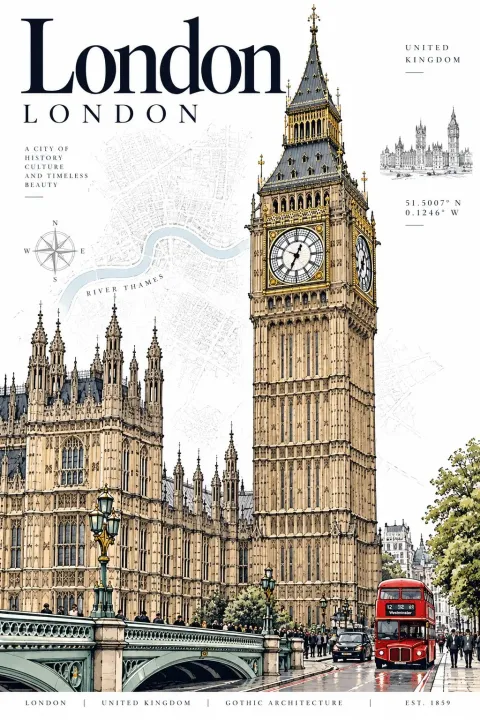
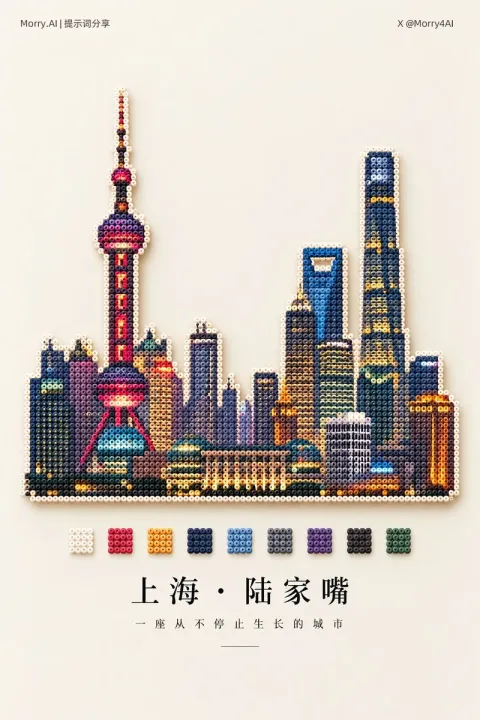
GPT image 2 on chatgpt
Prompt:
DESTINATION: [CITY / DESTINATION]
COUNTRY: [COUNTRY]
Create a sophisticated vertical 2:3 premium architectural travel postcard for [DESTINATION], [COUNTRY].
CORE STYLE
Use the visual language of a high-end contemporary architectural travel poster combined with refined vintage editorial illustration.
The design should feel:
elegant
cultured
timeless
architectural
collectible
premium
museum-shop quality
Combine extremely detailed architectural pen-and-ink illustration, delicate graphite linework, restrained watercolor-style flat color, archival cartographic graphics, elegant editorial typography, and generous white space.
Do NOT make it look like a generic tourist poster.
MAIN ARCHITECTURAL HERO
Select ONE iconic and instantly recognizable architectural landmark strongly associated with [DESTINATION].
Examples can include:
historic monument
palace
cathedral
mosque
temple
tower
bridge
government building
famous street façade
traditional architectural landmark
modern architectural icon
The selected landmark must be the dominant visual subject.
Show it from a believable three-quarter or slightly dramatic architectural perspective.
Maintain accurate architectural proportions and recognizable structural details.
Do not combine multiple major landmarks into one main illustration.
ILLUSTRATION STYLE
Render the main landmark using exceptionally fine black or dark graphite ink lines.
Include:
detailed architectural hatching
precise windows
doors
columns
roofs
arches
ornaments
façade details
realistic structural geometry
subtle hand-drawn imperfections
Keep the architecture primarily as detailed line art with selective flat color.
Use refined illustrative detailing rather than photorealistic rendering.
COLOR PALETTE
Use mostly white space with only 2–4 sophisticated destination-specific colors.
Choose colors naturally associated with [DESTINATION] or the landmark.
Examples:
muted architectural stone tones
traditional local colors
restrained blue
muted green
terracotta
burgundy
soft red
architectural gold
subtle natural tones
Colors should be elegant and slightly muted.
Avoid:
neon colors
excessive saturation
gradients
glossy effects
muddy sepia
excessive beige
photorealistic color grading
BACKGROUND
Use a clean pure white background.
Behind the architecture, add extremely subtle archival graphic elements such as:
faint city map
street plan
river outline
coordinates
contour lines
architectural diagram
compass
grid lines
local-language annotations
minimal geographical markings
These elements must remain secondary and lightly faded.
Do not allow the background map to overpower the main architecture.
COMPOSITION
Use a vertical 2:3 editorial composition.
The main landmark should occupy approximately 60–75% of the artwork.
Create generous negative space around the typography and architectural subject.
Use an asymmetric premium editorial layout.
The composition should feel carefully designed rather than centered like a basic tourist souvenir.
Tasteful cropping is allowed when it creates a stronger architectural composition.
TYPOGRAPHY
At the top or upper-left area, display:
[DESTINATION]
Use large elegant high-contrast editorial serif typography inspired by premium architecture magazines and museum catalogues.
Below it, optionally include:
[LOCAL NAME]
using the authentic local writing system of the destination.
For example:
Seoul
서울
London
London
Tokyo
東京
Paris
Paris
Use restrained typography with generous letter spacing.
Do not use giant decorative typography that overwhelms the architecture.
SECONDARY INFORMATION
Include a small elegant information block containing destination-specific details such as:
[SHORT DESTINATION DESCRIPTION]
[COORDINATES]
[LOCAL NAME]
[COUNTRY]
Use tiny refined typography with generous spacing.
Optional subtle elements:
compass
small architectural sketch
miniature landmark drawing
local-language stamp-like mark
faint map label
Keep all secondary elements minimal.
ARCHIVAL MAP ELEMENT
Include a very subtle map or street-plan layer related specifically to [DESTINATION].
If the destination has a recognizable river, coastline, mountain, historic district, or urban grid, integrate it naturally into the background.
Add a small understated geographical label where appropriate.
Do not create a cluttered map.
CONTEXTUAL DETAILS
Add only a few tiny environmental elements when they naturally belong to the location:
pedestrians
bicycles
trees
street lamps
local vehicles
benches
small street details
birds
These elements should primarily establish scale and atmosphere.
Do not turn the image into a busy city scene.
DESTINATION AUTHENTICITY
Make the architecture, typography, environmental details, colors, map elements, and small contextual objects culturally and geographically appropriate to [DESTINATION], [COUNTRY].
Avoid generic architecture that could belong to another city.
The landmark must immediately communicate the destination.
VISUAL HIERARCHY
Priority order:
Main architectural landmark
Destination name
Supporting map / archival graphics
Local-language name
Small contextual details
Coordinates and information strip
Everything should support the main landmark.
BOTTOM INFORMATION STRIP
At the bottom, add a refined museum-catalogue-style information strip:
[DESTINATION] | [COUNTRY] | [ARCHITECTURAL STYLE] | EST. [YEAR]
Keep it small, elegant, evenly spaced, and understated.
If the landmark's construction date is uncertain, use an appropriate historical date or omit the year rather than inventing information.
MOOD
Quiet urban sophistication.
Cultural authenticity.
Architectural heritage.
Modern editorial design.
Historical character combined with contemporary graphic design.
The final artwork should feel like a premium collectible architectural print purchased from a museum design shop.
AVOID
No landmark collage.
No fake architecture.
No random buildings.
No generic tourist-poster aesthetic.
No cartoon style.
No 3D rendering.
No glossy photorealism.
No excessive vintage filters.
No heavy sepia.
No fake passport stamps.
No excessive decorative elements.
No clutter.
No giant unnecessary text.
No random flags.
No inaccurate cultural symbols.
No distorted architecture.
No unrealistic perspective.
No excessive gradients.
No excessive beige.
FINAL GOAL
Create a highly detailed, sophisticated, timeless architectural travel postcard that could work consistently for ANY city or country while maintaining the same premium visual identity.
Only change the destination-specific elements such as:
[DESTINATION]
[COUNTRY]
[ICONIC LANDMARK]
[LOCAL NAME]
[ARCHITECTURAL STYLE]
[COORDINATES]
[ESTABLISHED / CONSTRUCTION YEAR]
[DESTINATION-SPECIFIC COLORS]
[MAP / GEOGRAPHICAL ELEMENTS]
Everything else should maintain the same refined editorial postcard design language.
让你的照片看起来像是专业画家画的 ✨
① 上传你的图片
② 粘贴下方的提示词
③ 生成你的精细素描
提示词:
1... prompt
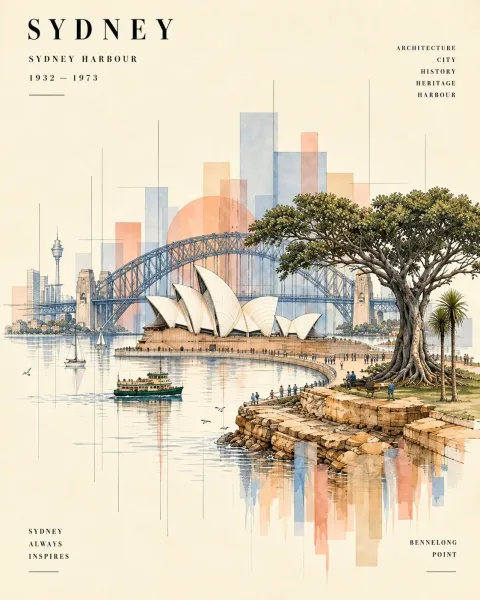
Create a high-end vintage architectural travel poster of Sydney Harbour, Australia, in an elegant hand-drawn watercolor and fine architectural illustration style.
Show the Sydney Opera House prominently in the center, with the Sydney Harbour Bridge gracefully spanning the background. Include calm harbour water with subtle reflections, a small vintage ferry and a few tiny sailboats, pedestrians walking along the waterfront promenade, and a large mature banyan tree with detailed roots and branches in the foreground on the right.
Use a sophisticated editorial composition with soft cream/off-white paper texture, delicate pencil linework, muted pastel colors, warm beige, dusty blue, soft coral, pale green and subtle gray tones. Add translucent geometric architectural shapes and abstract city silhouettes behind the landmarks, blending modern architecture with vintage travel-poster aesthetics.
The artwork should feel like a collectible 1930s–1970s architectural heritage poster: refined, minimal, sophisticated, slightly faded print texture, realistic proportions, intricate architectural details, atmospheric depth, soft natural daylight, subtle watercolor washes, clean negative space.
Add elegant typography at the top:
“SYDNEY”
and underneath:
“SYDNEY HARBOUR”
“1932 — 1973”
On the right side, add small editorial text:
“ARCHITECTURE
CITY
HISTORY
HERITAGE
HARBOUR”
At the bottom left:
“SYDNEY
ALWAYS
INSPIRES”
At the bottom right:
“BENNELONG
POINT”
Vertical 4:5 poster composition, premium museum exhibition poster, sophisticated editorial graphic design, highly detailed watercolor illustration, realistic landmark architecture, clean typography, no modern UI elements, no people in close-up, no watermark.
---
2.. prompt
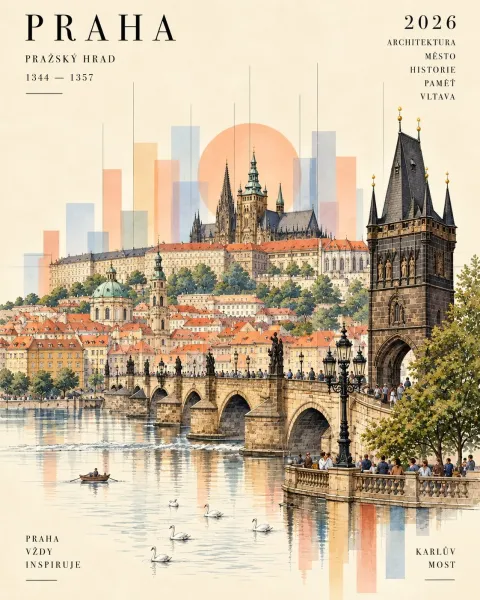
Create a premium vintage architectural travel poster of Prague, Czech Republic, inspired by the reference image.
Main composition: a beautifully detailed hand-drawn watercolor and fine-ink illustration of Prague Castle and St. Vitus Cathedral overlooking the historic red-roofed city. In the foreground, show Charles Bridge crossing the Vltava River, with its distinctive stone arches, Gothic Old Town Bridge Tower on the right, ornate historic street lamps, statues, pedestrians, small boats, and several white swans on the calm water.
Use a sophisticated editorial architectural illustration style with delicate pencil outlines, realistic historical architecture, soft watercolor washes, subtle paper grain, muted cream, warm beige, dusty blue, pale coral, terracotta, soft green and gray tones. Add translucent geometric rectangles and abstract architectural silhouettes behind the city, creating the same modern-meets-vintage graphic design aesthetic.
The scene should have elegant atmospheric depth and soft natural daylight, with gentle reflections in the river. Keep the composition airy and refined with generous negative space around the illustration.
Typography:
Top left in large elegant serif letters:
“PRAHA”
Under it in smaller uppercase text:
“PRAŽSKÝ HRAD”
“1344 — 1357”
Top right:
“2026”
Below it, vertically arranged small text:
“ARCHITEKTURA
MĚSTO
HISTORIE
PAMĚŤ
VLTAVA”
Bottom left:
“PRAHA
VŽDY
INSPIRUJE”
Bottom right:
“KARLŮV
MOST”
Vertical 4:5 poster format, luxury museum exhibition poster, European heritage travel poster, highly detailed architectural watercolor, elegant editorial typography, subtle vintage print texture, sophisticated minimalist layout, realistic proportions, refined composition, no modern objects, no Instagram interface, no watermark.